Navigating New York State sales tax requirements can feel overwhelming, especially for small business owners and ecommerce sellers juggling multiple responsibilities. With deadlines, rate changes, and evolving nexus rules, NYS sales tax filing has become increasingly complex. Yet getting it right is crucial—penalties for non-compliance can be steep, and accurate filing protects your business from costly audits and legal complications.
This comprehensive guide demystifies the NYS sales tax filing process, providing clear, actionable steps to help you stay compliant, avoid penalties, and streamline your tax obligations in 2026 and beyond.
Understanding New York State Sales Tax Basics
Before diving into the filing process, it's essential to understand what you're dealing with. New York State imposes a sales tax on retail sales of tangible personal property and certain services. The state rate is 4%, but combined with local taxes, the total rate ranges from 7% to 8.875% depending on your location.
Who Needs to File NYS Sales Tax?
You're required to register for and collect NYS sales tax if you have nexus in New York. Nexus means a significant presence or connection to the state, which can be established through:
Physical Nexus:
Economic Nexus:
This applies to all sellers, including out-of-state ecommerce businesses. If you meet these thresholds, you must register, collect, and remit NYS sales tax regardless of whether you have a physical presence in the state.
What's Taxable in New York?
New York taxes most tangible personal property and specific services. Generally taxable items include:
Exempt items typically include:
Understanding what's taxable versus exempt is crucial for accurate sales tax collection and filing.
Step 1: Register for a Sales Tax Certificate of Authority
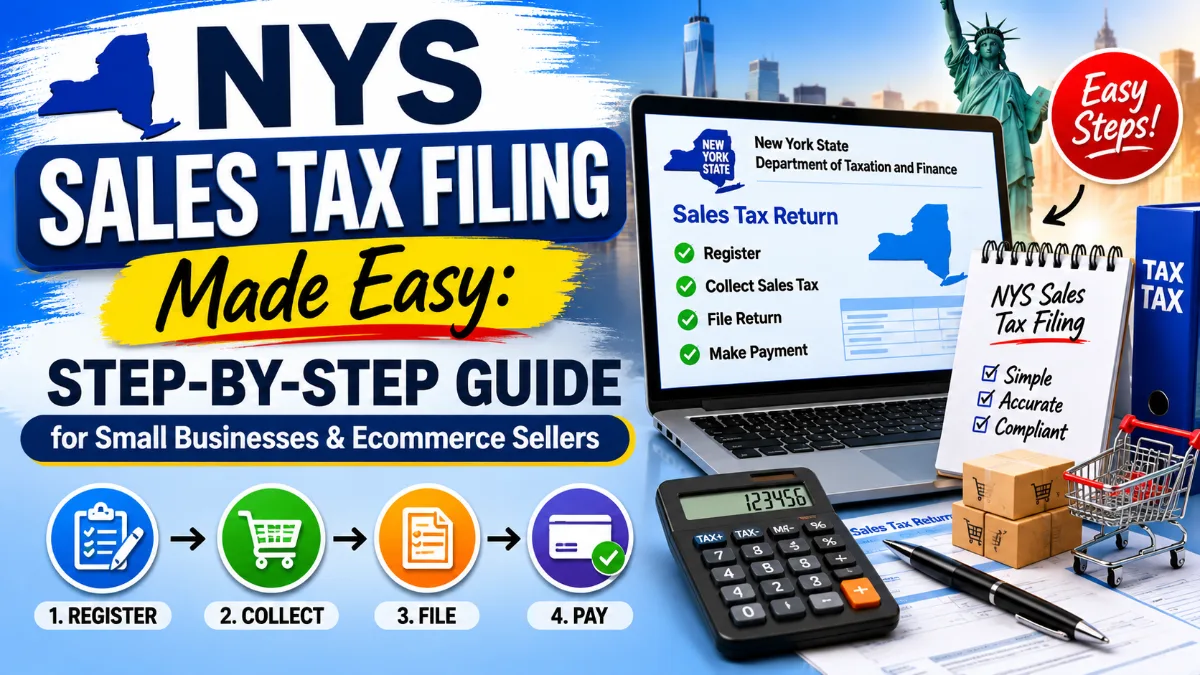
Before you can legally collect sales tax in New York, you must obtain a Certificate of Authority from the New York State Department of Taxation and Finance.
How to Register:
Online Registration (Recommended):
You'll receive your Certificate of Authority immediately upon approval. There's no fee to register.
Paper Registration: Download Form DTF-17 (Application for Registration as a Sales Tax Vendor) from the NYS Tax Department website, complete it, and mail it to the address listed on the form. Processing takes 2-4 weeks.
Filing Frequency Assignment
When you register, New York will assign you a filing frequency based on your expected sales tax liability:
Your assigned frequency determines your filing schedule and deadlines throughout the year.
Step 2: Collect Sales Tax from Your Customers
Once registered, you're legally required to collect the appropriate sales tax on all taxable sales delivered to New York addresses.
Determining the Correct Tax Rate
New York has varying local tax rates, making rate determination complex. The rate depends on the delivery location, not your business location.
For Brick-and-Mortar Businesses: Apply the combined state and local rate for your business location.
For Ecommerce Sellers: Apply the rate based on where you ship the product. Use the NYS Tax Department's sales tax rate lookup tool or integrate sales tax automation software that calculates rates automatically based on ZIP codes.
Best Practices for Collection:
Step 3: Track and Record Your Sales Tax Collections
Accurate record-keeping is essential for smooth NYS sales tax filing and audit protection. Maintain detailed records including:
Keep these records for at least three years, as New York can audit returns going back this period (or longer in cases of fraud or non-filing).
Record-Keeping Tools:
Most modern accounting software includes sales tax tracking features. Popular options include:
For ecommerce sellers, platforms like Shopify, WooCommerce, and BigCommerce often integrate with sales tax automation services like Avalara, TaxJar, or Vertex that handle calculation, tracking, and reporting.
Step 4: File Your NYS Sales Tax Return
This is where the rubber meets the road. New York requires electronic filing for most businesses, making the process faster and more accurate than traditional paper filing.
Filing Deadlines
Returns are due on the 20th day of the month following the reporting period:
If the 20th falls on a weekend or holiday, the deadline extends to the next business day.
Step-by-Step Filing Process:
1. Access the Online Services Portal
Visit the New York State Department of Taxation and Finance Online Services website and log in with your credentials. If it's your first time, you'll need to register for online access using your Sales Tax ID and other identifying information.
2. Navigate to Sales Tax Filing
Once logged in, select "File a Return" and choose "Sales and Use Tax Return" (Form ST-100 series).
3. Select Your Filing Period
Choose the correct filing period from the dropdown menu. Make sure you're filing for the right quarter or month.
4. Enter Your Sales Information
The return asks for several key figures:
Break down sales by jurisdiction if you sold in multiple locations within New York.
5. Report Purchases Subject to Use Tax
If you made purchases for business use from out-of-state vendors who didn't charge you New York sales tax, you may owe use tax. Report these purchases and calculate the use tax due.
6. Calculate Any Credits or Adjustments
If you have any allowable credits (such as sales tax paid on bad debts or returned merchandise), enter them here. You can also adjust for any errors from previous returns.
7. Review and Submit
Carefully review all entries for accuracy. Common mistakes include:
Once you're confident everything is correct, submit the return electronically.
8. Save Confirmation
After submission, you'll receive a confirmation number. Save or print this confirmation for your records.